Payments · Stablecoins · Infrastructure

Fivo
One integration to accept stablecoins across nine networks.
Fivo is stablecoin payment infrastructure for online merchants: the customer pays in USDC or EURC from the network where they hold funds, and the merchant gets paid through a single integration. Wallets, on-chain verification and cross-network movement stay inside the system.
- 9
- Mainnet networks
- USDC + EURC
- Stablecoins
- 3
- Integration methods
- Testnet + Mainnet
- Separate environments
The problem
Accepting stablecoins shouldn't mean integrating one blockchain after another.
Accepting USDC sounds simple. Underneath there are different networks, different contracts, wallets, confirmations and payment states that nobody wants to maintain inside an online store.
- 01
Multiple networks
Each network has its own USDC contracts, RPC nodes and confirmation times.
- 02
Token and network compatibility
EURC does not exist on every network: a chain can be valid for one token and not for another.
- 03
Wallet interaction
Connect, check balances on each network and sign the right transaction from the browser.
- 04
Cross-network movement
If the customer holds funds on Polygon and the merchant collects on Base, someone has to move the value.
- 05
Confirmation and state
Verify on-chain that the payment arrived, for the right amount, and reflect it in a reliable state.
- 06
Integration and operations
The developer needs an API; the merchant needs to see, refund, withdraw and invoice.
contracts · RPC · wallets · confirmations · states
One integration per network, each with its own life cycle.
one integration
The networks sit behind the system.
Fivo moves blockchain complexity away from the merchant integration.
One integration
One integration. Multiple ways to accept payments.
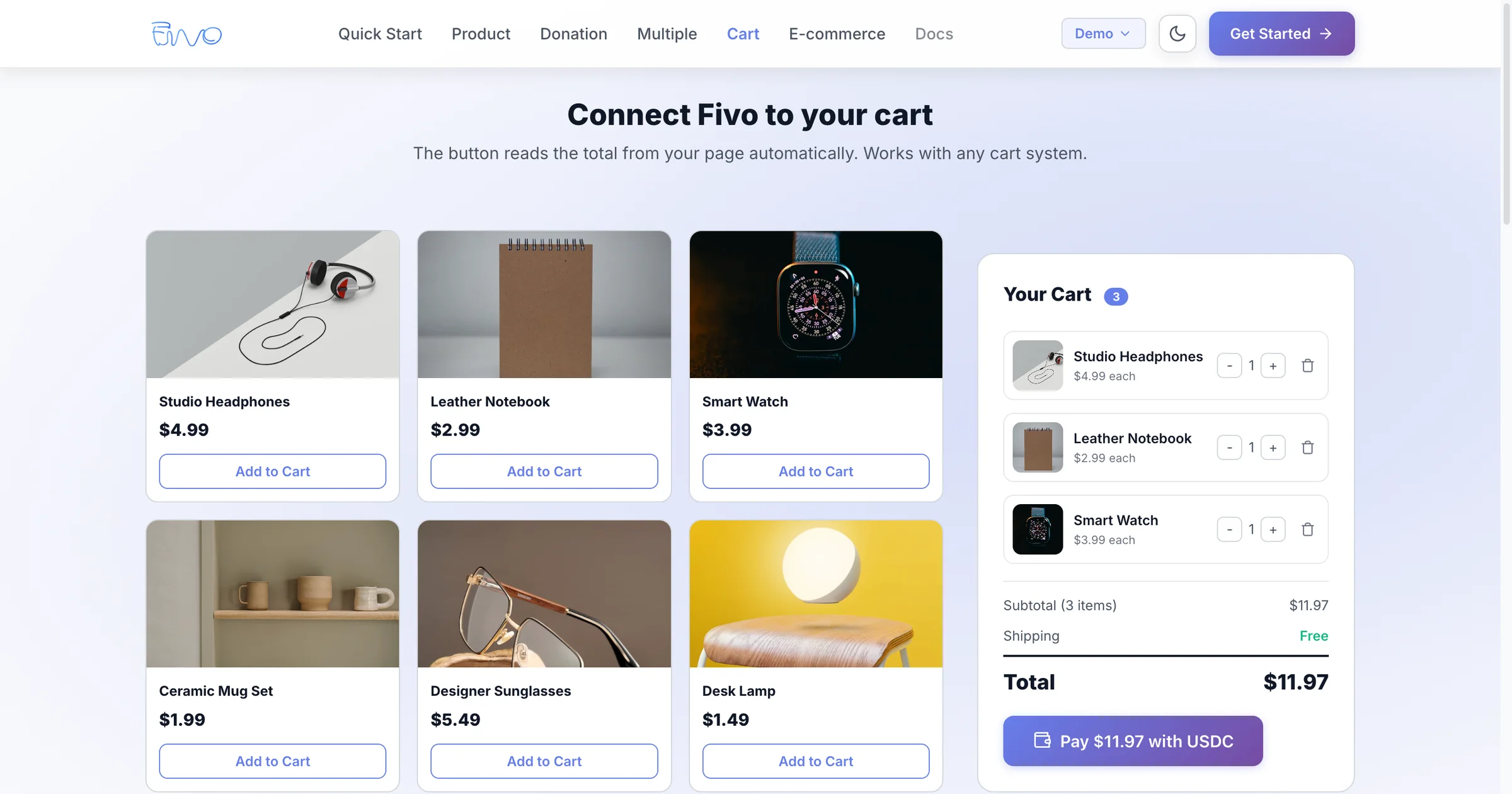
Three paths on the same infrastructure: a button that embeds in any page, hosted checkout sessions and a REST API with merchant keys.
Embeddable button
One script and one HTML element. The button opens the Fivo checkout in a full-screen iframe and the payment comes back with its state.
- Fixed or open amount
- Reads the cart total from the page (data-amount-from)
- Reference, description and metadata per payment
Product
Fixed amount per item.
Donation
Open amount chosen by the customer.
Cart
Total read from the page itself.
Multiple products
One button per item on the same page.
<script async src="https://checkout.fivo.finance/v1/fivo.js"></script>

<fivo-button
  merchant-id="fivo_live_YOUR_ID"
  amount="29.99"
  currency="USDC"
  data-reference="order_1042">
</fivo-button>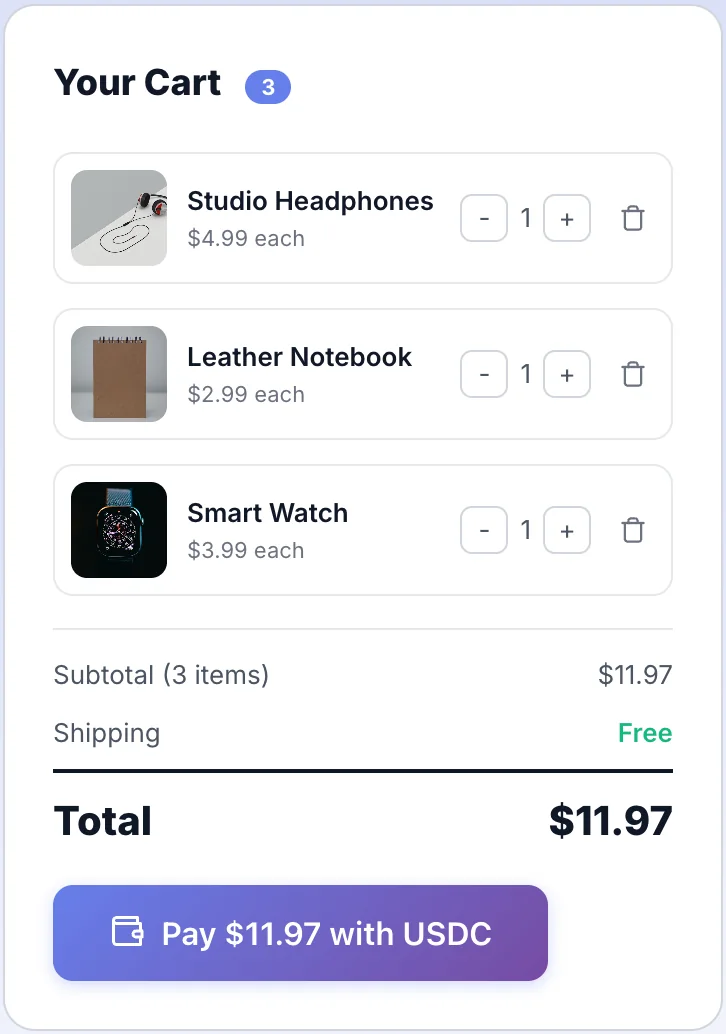
Fivo button in the demo store cart
What the customer sees
One payment, start to finish.
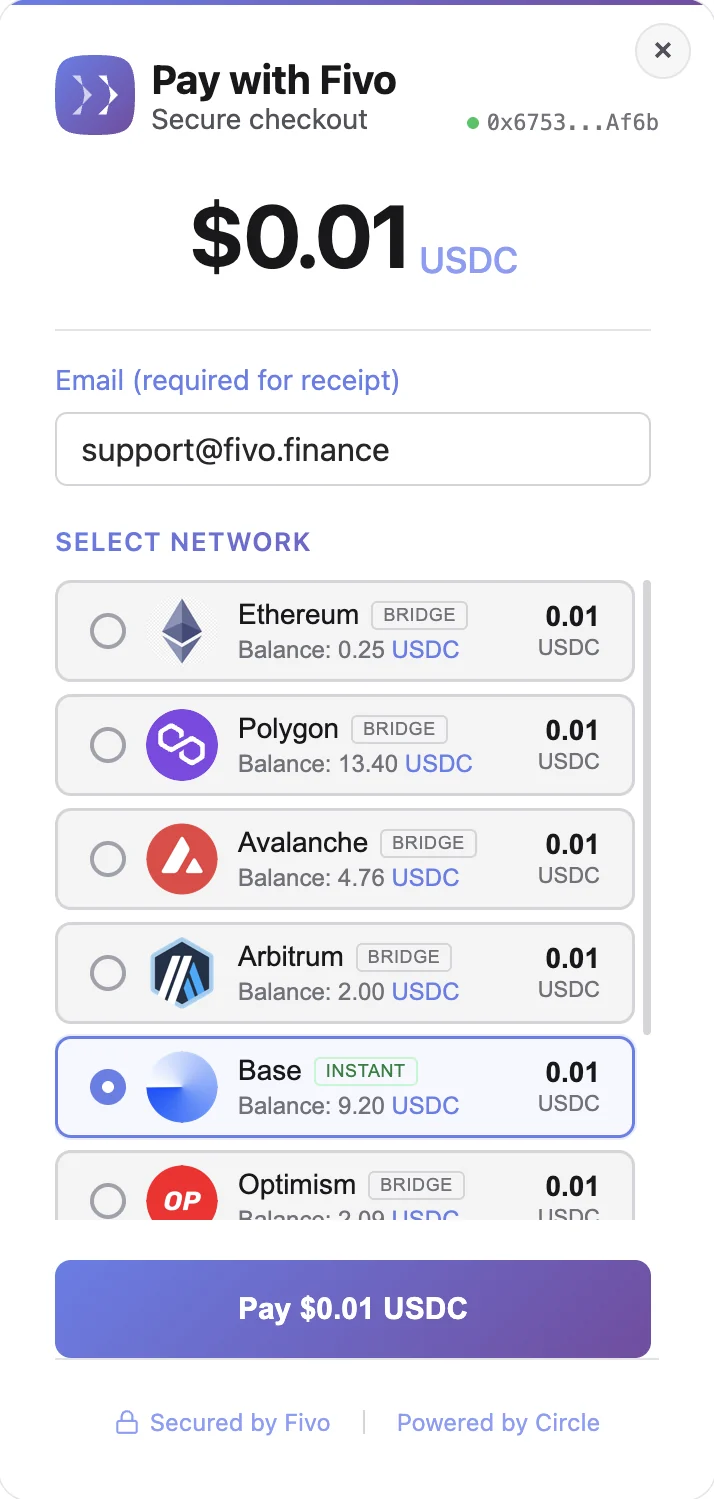
The customer doesn't pick a blockchain: they pick where they hold funds. Fivo checks their balances across every supported network and shows only the valid options.
01
Connect the wallet
The checkout opens with the amount. The customer connects their wallet (MetaMask, WalletConnect, Coinbase Wallet and others) and leaves an email for the receipt.
Wallet connected0x6753…Af6b
02
Choose stablecoin and network
Fivo reads USDC and EURC balances on each network and marks whether the payment will be direct (same network) or bridged.
03
Review amount and fees
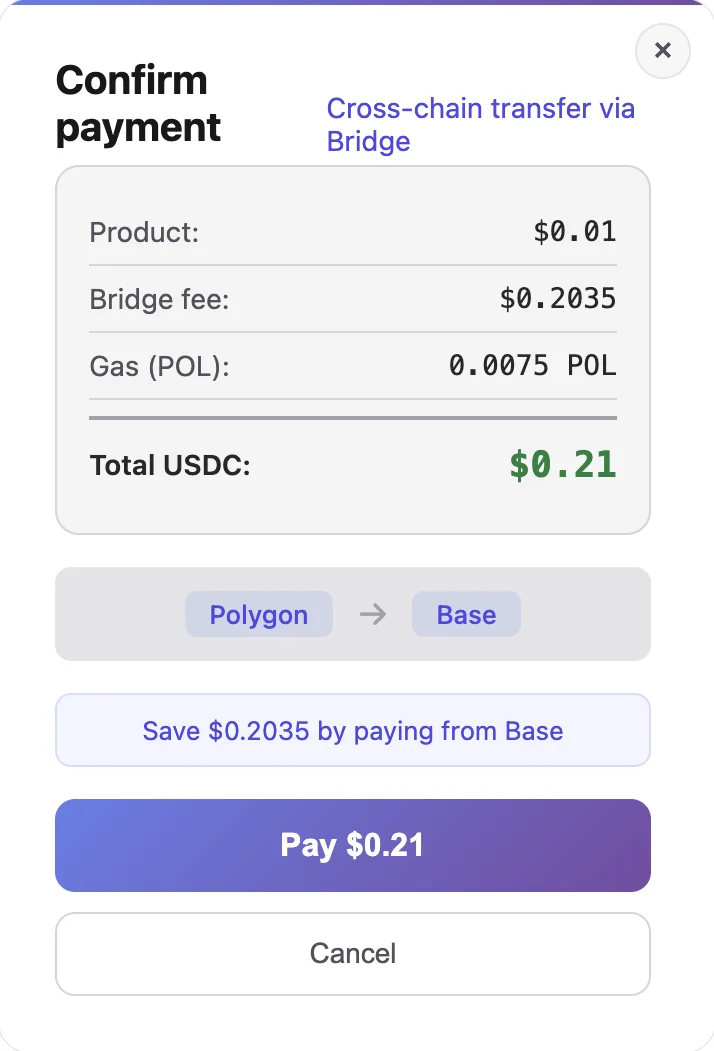
If the customer's network is not the merchant's, the checkout breaks down product, bridge fee and gas before signing.
04
Confirm in the wallet
The customer signs the approval and the transfer from their own wallet. The payment leaves directly from it.
SignatureApproval + transfer
05
On-chain confirmation
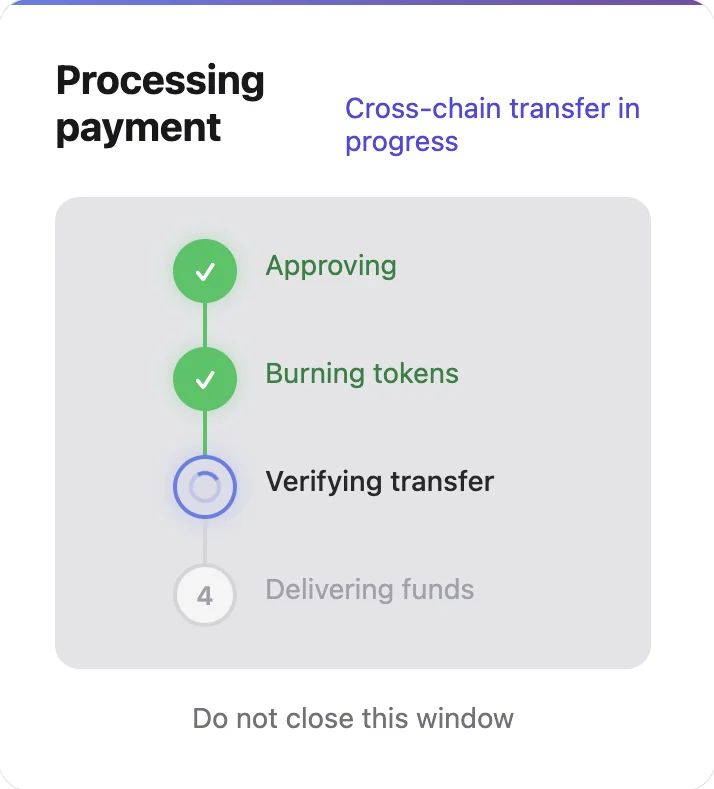
Approval, burn, verification and delivery: progress is shown step by step until the funds reach the merchant wallet.
06
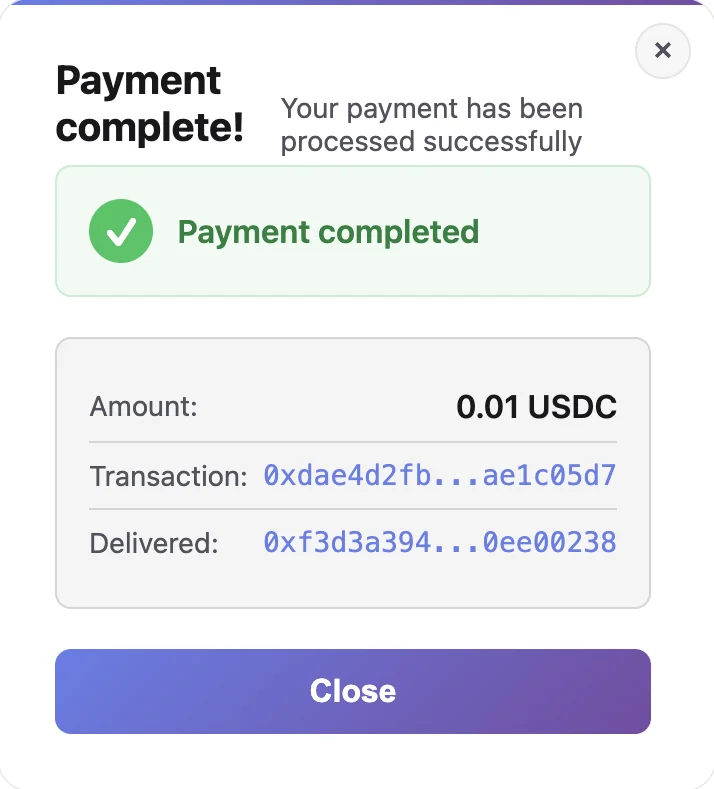
Payment complete
The backend verifies the transaction on-chain and marks the payment as completed. The customer sees the hash and the merchant receives the event.
Real Fivo checkout screens in the light theme. Test amount: 0.01 USDC, from Polygon to Base.
Cross-chain
The customer pays from their network. The merchant receives where needed.
When the customer's network and the merchant's don't match, Fivo uses Circle Bridge Kit on CCTP v2 to move USDC between chains inside the same payment. The merchant receives the exact amount in their wallet; the customer covers the bridge fee and gas.
A different network for the customer. One integration for the merchant.
- Customer
USDC · Polygon
Customer wallet
- Fivo checkout
Estimate and confirmation
Fee breakdown before signing
- Circle cross-chain layer
Bridge Kit · CCTP v2
approve → burn → attestation → mint
- Merchant
USDC · Base
Merchant wallet
- Fivo backend
On-chain verification
burn verified → payment completed → webhook
Same network
If the customer already holds USDC or EURC on the merchant's network, the payment is a direct transfer: one confirmation and receipt verification in the backend.
EURC
EURC is accepted on Ethereum, Avalanche and Base, always on the same network: it is not moved across chains.
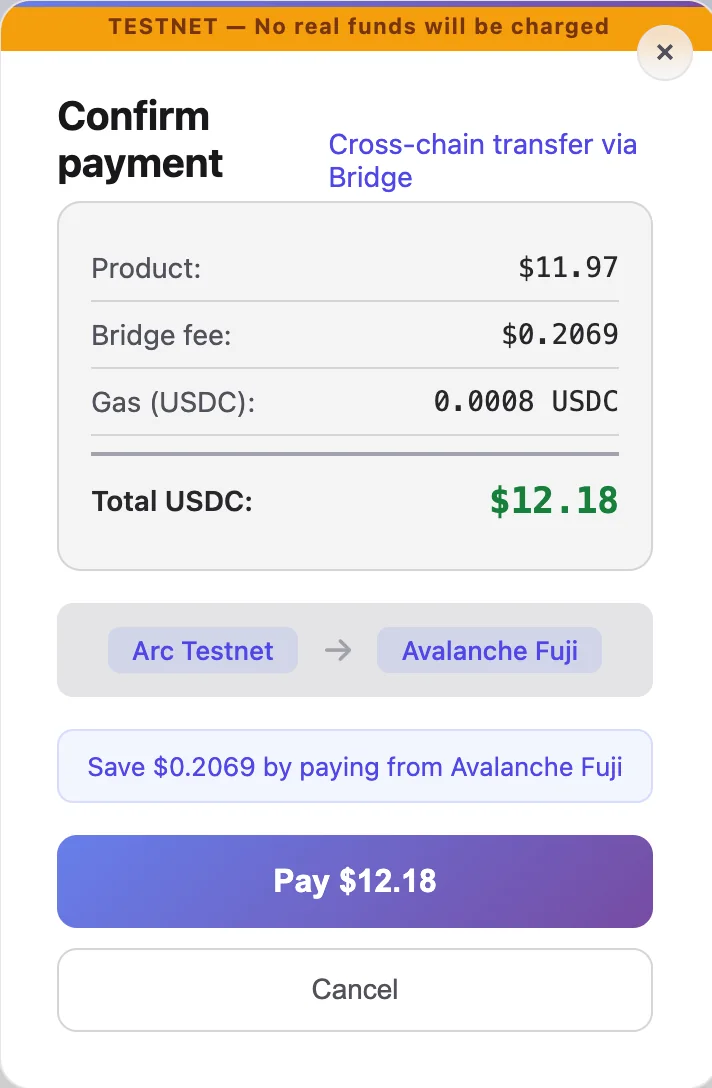
Real checkout screen (test environment): the customer sees the route between networks, the fees and how much they would save by paying from the merchant's network.
Networks
Nine mainnet networks. One integration.
The list of networks lives in the system configuration, not in the merchant's code. USDC is accepted on all of them; EURC on the networks where Circle issues it.
- 1Cross-chain: the customer can pay in USDC from any of the nine networks; the merchant receives on theirs.
- 2EURC is accepted only on the merchant's own network.
- 3Arc is available in the test environment (testnet).
| Network | USDC | EURC | Cross-chain USDC |
|---|---|---|---|
| Ethereum | Yes | Yes | Yes |
| Polygon | Yes | No | Yes |
| Avalanche | Yes | Yes | Yes |
| Arbitrum | Yes | No | Yes |
| Base | Yes | Yes | Yes |
| Optimism | Yes | No | Yes |
| Linea | Yes | No | Yes |
| Unichain | Yes | No | Yes |
| Sonic | Yes | No | Yes |
Merchant platform
The payment completes. The operation continues.
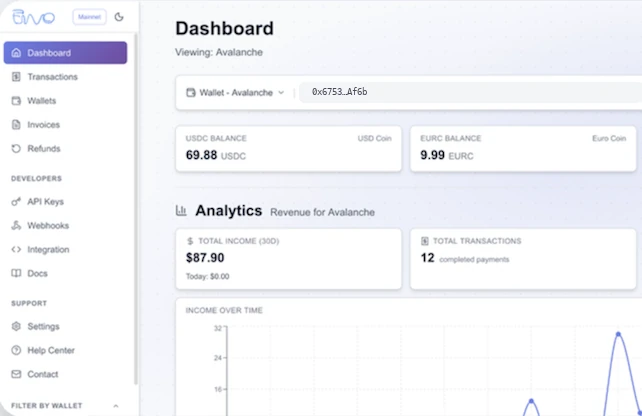
The merchant dashboard is not a transaction viewer: it manages wallets per network, withdrawals, refunds, invoices, webhooks and API keys from the same place.
 Real-time updates
- 1
Transactions
List with saved filters, search, detail for each payment and export to Excel or PDF.
- 2
Wallets and balances
One wallet per network with USDC and EURC balances; withdrawals to the merchant's address protected with 2FA.
- 3
Refunds
Full or partial, on-chain, with a PDF receipt for the customer.
- 4
Invoices
One automatic invoice per withdrawal, numbered and in the language of the billing country.
- 5
Webhooks
Endpoint setup, testing, secret regeneration and delivery logs.
- 6
API keys
Live and test keys, shown once and stored hashed.
Operational automation
What happens after the payment is handled too.
Payment, refund and withdrawal are complete flows: each one ends in a record, a notification and, when needed, a document.
Payment
- On-chain transaction
- Receipt verification
- payment.completed
- Signed webhook and email to the merchant
- Receipt to the customer
Refund
- Full or partial request, with 2FA
- On-chain transaction from the merchant wallet
- refund.completed
- PDF receipt to the customer
Withdrawal
- On-chain batch: amount to the merchant, 0.5% fee to Fivo
- Withdrawal completed
- FIV-YYYY-NNNN invoice as PDF
- Email with the invoice
Payment-intent scanner
Every two minutes it checks on-chain for same-network payments that have not been confirmed yet.
Cross-chain recovery scanner
Every five minutes it looks for CCTP mints that were never recorded and completes the payment.
Webhook retries
Three retries with growing delays and automatic disabling after ten consecutive failures.
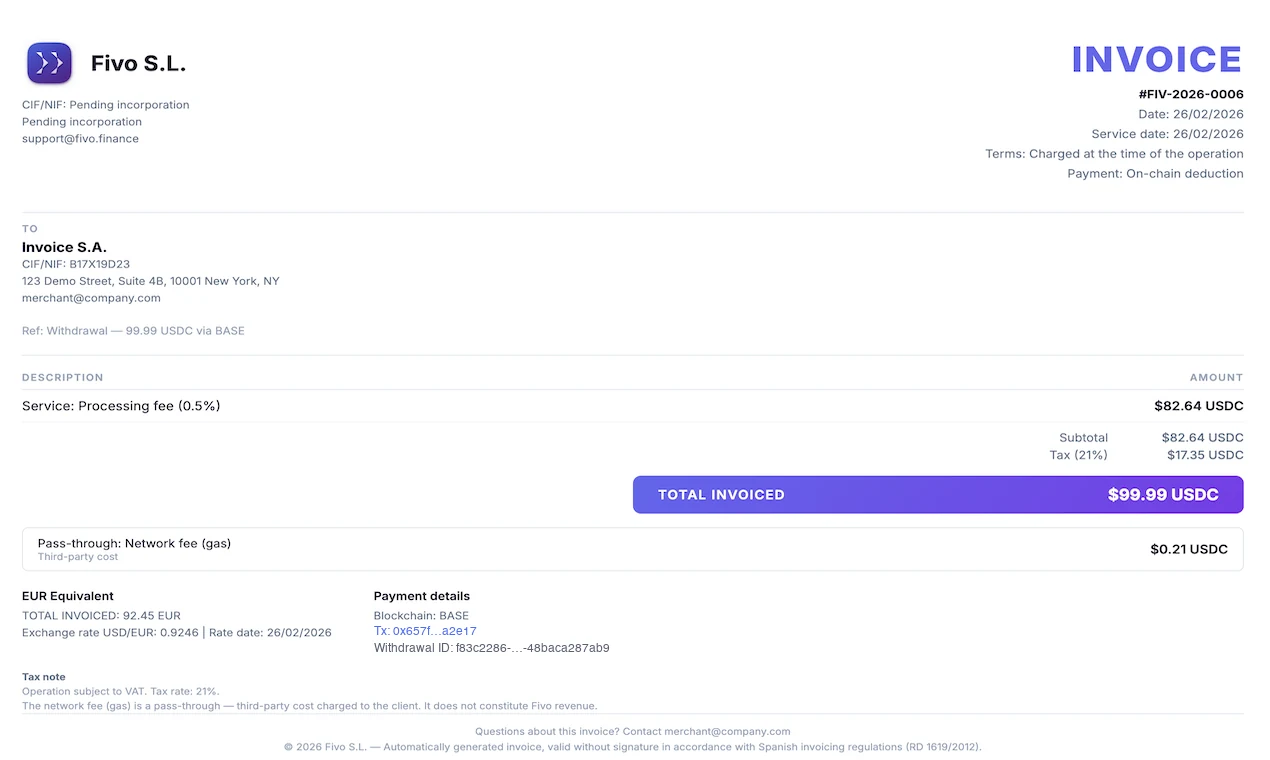
Automatic invoice per withdrawal: fee, VAT when applicable, EUR equivalent and on-chain reference.
Developer infrastructure
Built to integrate, not to make you rebuild your product.
The same surface the checkout uses is available to the developer: REST API, signed webhooks, keys per environment and public documentation.
REST API
Payments, refunds, wallets, invoices and webhooks under api.fivo.finance, authenticated with X-API-Key.
api.fivo.finance
Signed webhooks
Five payment and refund events, HMAC-SHA256 signature with timestamp, retries and delivery logs.
X-Fivo-Signature
API keys
fivo_live_ and fivo_test_ prefixes, visible once and stored hashed.
fivo_live_ · fivo_test_
Documentation
Quick start, API reference, webhooks, CCTP, invoicing and test environment.
fivo.finance/docs
event
payment.completed
- X-Fivo-Event: payment.completed
- X-Fivo-Timestamp: 1757152200
- X-Fivo-Signature: sha256=…
signature
HMAC-SHA256( timestamp . body )
Retries: 1 s · 5 s · 25 s
Merchant endpoint
200 OK
- payment.completed
- payment.failed
- refund.created
- refund.completed
- refund.failed
Two independent deployments: integrate and test without touching real funds.
Build
- test.fivo.financeapi-test.fivo.financecheckout-test.fivo.financefivo_test_ keys · cs_test_ sessionsTest USDC from the Circle faucet
Go live
- fivo.financeapi.fivo.financecheckout.fivo.financefivo_live_ keys · cs_live_ sessionsNine mainnet networks
Security
Security does not live in a single layer.
Each layer of the system has its own controls. None of them is a slogan: they are in the code.
- 01 · User
Authentication
- Mandatory 2FA on every login: email, TOTP app or SMS
- Short sessions with rotating renewal
- Email alert when signing in from a new device
- 02 · API
Keys and limits
- Hashed API keys, visible once
- Request limits per endpoint: login, withdrawals, public payments
- Schema validation and captcha on public forms
- 03 · Events
Signed webhooks
- HMAC-SHA256 signature with timestamp
- SSRF and redirect protection on merchant endpoints
- Circle webhooks verified with ECDSA signatures
- 04 · Payments
On-chain verification
- Receipt check: correct contract, recipient, sender and amount
- Recovery scanners for unrecorded payments
- Withdrawals and refunds with 2FA
- 05 · System
Traceability
- Audit log of withdrawals and refunds with IP, device and 2FA context
- CSP and HSTS headers
- TOTP secrets encrypted with AES-256-GCM
No “bank-grade” promises: concrete controls, verifiable in the implementation.
Circle
Built on Circle infrastructure.
Fivo doesn't reinvent stablecoins or bridges: it builds the merchant payment layer on top of Circle's rails.
Fivo is an independent product. Circle Alliance membership does not imply ownership, endorsement or exclusivity on Circle's part.
01
USDC and EURC
The stablecoins issued by Circle, on the networks where they are available.
02
Programmable Wallets
Merchant wallets managed by the system (developer-controlled, SCA accounts), with Gas Station for withdrawals and refunds.
03
Bridge Kit and CCTP v2
USDC movement between networks inside the payment, with Circle's Forwarding Service for attestation and minting.
04
Circle webhooks
Wallet events verified with Circle's public key.
Engineering
A complete financial product, not an isolated integration.
Fivo is the kind of system Nafureanu designs and builds: several components with clear responsibilities, connected by events, and in production.
- 01Payments
Checkout and payment states
React widget, multi-network balance scanning, hosted sessions and a state machine from pending to completed or failed.
- 02Blockchain
Nine networks and cross-chain
Network and token configuration per environment, direct transfers and CCTP v2 bridges with receipt verification.
- 03Backend
API and event processing
Node.js and Express in TypeScript, PostgreSQL with Prisma and periodic workers for withdrawals, refunds and payment recovery.
- 04Merchant product
Operations dashboard
Next.js with real-time updates: transactions, wallets, withdrawals, refunds, invoices, webhooks and keys.
- 05Automation
Notifications, invoices and refunds
Transactional emails, PDF invoices in 22 languages with EU VAT rules and refund receipts.
- 06Security
Authentication, signatures and audit
Mandatory 2FA, hashed keys, signed webhooks, request limits and audit logs.
- 07Infrastructure
Deployment and nodes
Frontends on Vercel, API and database on Railway, Alchemy RPC with public fallback nodes and PDF storage on R2.
- 08Developer experience
Documentation and test environment
Three integration paths, public documentation and an independent testnet with its own key and session prefixes.
- TypeScriptReactNext.jsNode.jsExpressPostgreSQLPrismawagmi · viemCircle Programmable WalletsCircle Bridge KitCCTP v2AlchemyVercelRailway
Inside the product
Real product surfaces.
Screenshots of the checkout, the dashboard and the demo store, all in the light theme. Test data; no real merchant information.
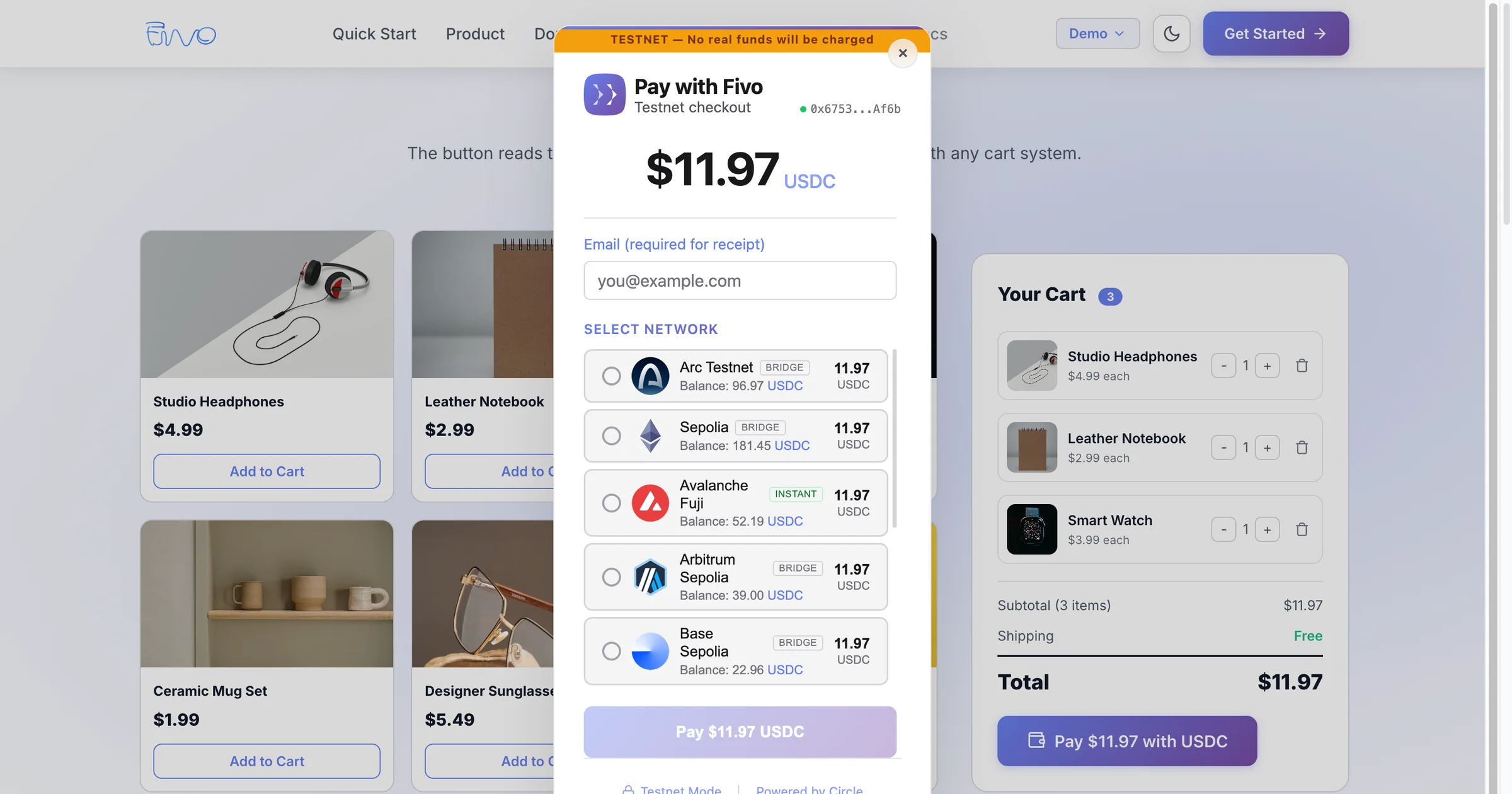
01 Checkout over the store
The button opens the Fivo checkout on top of the store itself: balances per network, payment type and the amount read from the cart.
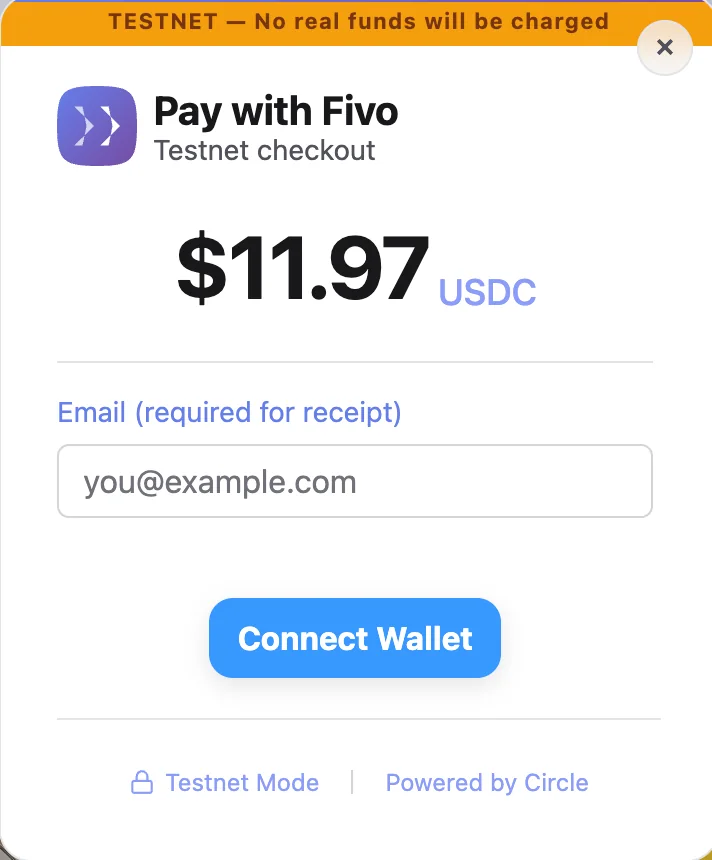
02 Wallet connection
The checkout opens with the amount and asks for the receipt email before connecting the customer's wallet.
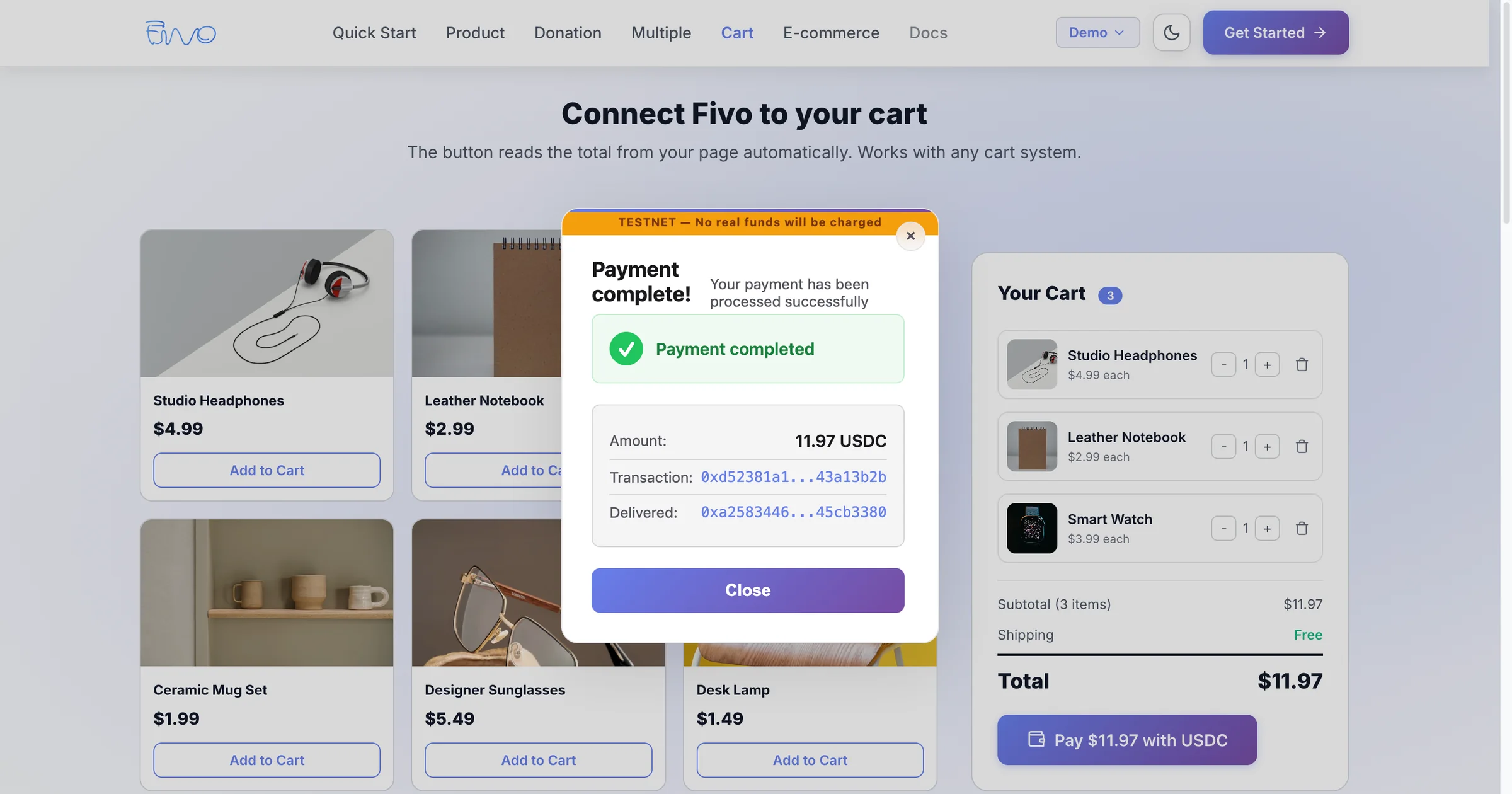
03 Payment completed over the store
The checkout's final state: amount, transaction and delivery confirmed without leaving the store.
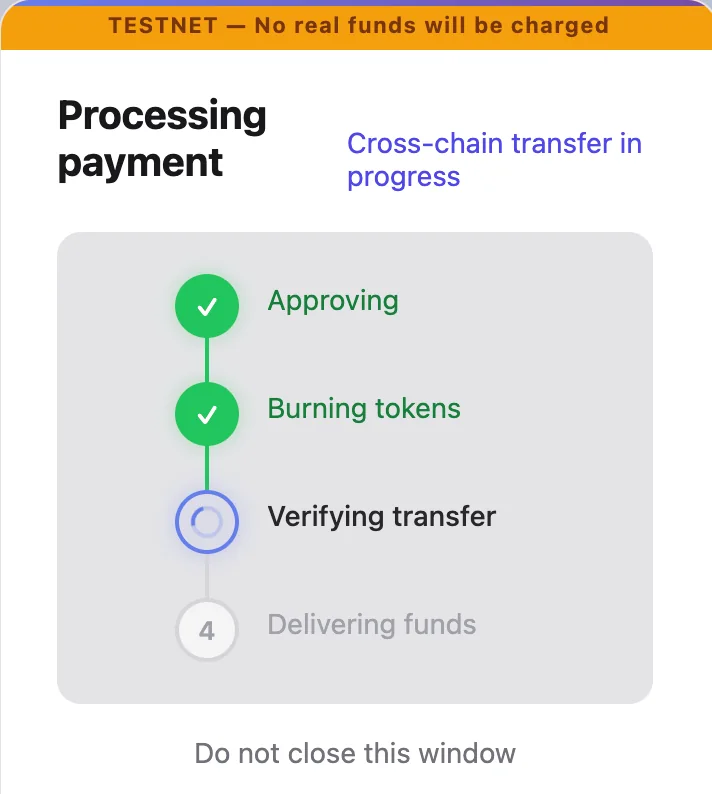
04 Cross-chain payment in progress
Approval, burn, verification and delivery: the customer sees each step until the funds arrive.
05 Automatic invoice
Generated after each withdrawal, with the fee, applicable VAT and the on-chain reference.
06 Merchant dashboard
Balances per wallet, revenue over time and access to transactions, invoices, refunds, webhooks and API keys.
Next step
Does your product need payments, automation or infrastructure that doesn't exist yet?
We design and build software around the problem, from architecture to production.
Related servicesIntegrations and APIsSaaS and digital products