Custom software
When the tool you need doesn't exist, we build it.
Custom software development for businesses. We design and develop software around concrete problems: internal platforms, applications, portals, operational tools and specialised systems that a generic solution cannot solve well.
We don't start by asking which technology you want to use. We start by understanding what the software has to do, who will use it, what information it needs, which rules it must apply and which systems it will have to live with.
- We need every request to go through review before approval
- This should be calculated automatically
- Right now we do it with three spreadsheets and email
- Customers need to see the status of their order
Buy, configure or build
Not everything needs custom software.
If an existing tool solves the problem well, using it is usually the sensible decision. Custom software makes sense when the process, the logic, the integration or the experience is specific enough that generic tools start creating friction.
Buy, configure or build
Does what already exists fit?
Build
The core doesn't fit
Design the system around the problem. This is where this service makes sense.
Signs that generic tools are creating friction
- Parallel fields and spreadsheets to cover what's missing
- People acting as the bridge between tools
- Business rules the tool cannot model
- An experience that cannot be adapted to the customer
Recommending the right option, even when it isn't building, is part of the job.
When custom software is the answer
The gap between what exists and what the business needs.
Generic software covers what's common. The problem appears in the gap between that and what your operation or your product really needs. These are the shapes that gap usually takes.
What exists
- Contacts
- Tasks
- Reports
- Settings
The gap
The tool you need simply doesn't exist.
Existing tools solve only part of the problem.
Important processes live between several applications.
A critical workflow has been built in spreadsheets.
People repeatedly perform logic the software could execute.
The user experience needs to be specific to the business.
The product depends on proprietary rules or data.
Integrations are too central to be treated as add-ons.
Growth is turning manual work into operational complexity.
There's an idea that now needs to become real software.
What the business needs
- Contacts
- Tasks
- Reports
- Settings
- Own rules
- Cross-system workflow
- Critical integrations
- Own experience
The more specific the gap, the more sense it makes to close it with software designed for it.
What “custom” actually means
We don't start from a template. We design the pieces the problem needs.
A custom application isn't a website with more features. It's a set of layers designed for one concrete problem. Select a layer to see what it decides.
Layers of the system
01 · Interface
How does someone interact with it?
Screens designed for each person's real work: the right actions in the right place, and nothing that isn't needed.
- Team dashboard
- Customer portal
The screens are the first layer you see. The eight underneath are what make the software solve the problem.
What we build
Software grouped by what the client needs, not by technology.
Select a type of software to see how the product surface changes. These are categories of intent; a real project usually combines several.
| Request | Customer | State | Owner |
|---|---|---|---|
| 4821 | Vela Distribution | In review | M. Serra |
| 4822 | Delta Works | Received | — |
| 4818 | Aral Group | Approved | L. Vidal |
Fictional surfaces illustrating each type of software. They are not client products.
The category's name matters little. What matters is what the software has to do and for whom.
The interface is only the visible part
We don't build screens. We build the system behind them.
What the user sees is the surface. Underneath there's a data model, business logic, permissions, workflows, integrations, automation and infrastructure. That's where most of the work is, and that's where it's decided whether the software still works a year from now.
- 01Data modelWhat exists and how it relates
- 02Business logicRules, calculations and decisions
- 03PermissionsWho can see and do what
- 04WorkflowsStates and next steps
- 05IntegrationsSystems it lives with
- 06AutomationWhat happens on its own
- 07InfrastructureWhere it runs and how it's deployed
A project that starts with the screens usually ends up rebuilding everything else.
Patterns, not invented cases
Software problems that repeat, and the shape the solution usually takes.
These aren't client projects: they're patterns of need that appear in very different companies, with the type of system that usually solves them.
- 01
A team needs to review requests
Workflow application
Pattern · not a client case - 02
A customer needs access to their own information
Customer portal
Pattern · not a client case - 03
A decision depends on several sources of data
Data application
Pattern · not a client case - 04
A process crosses several external systems
Platform with integrations at the centre
Pattern · not a client case - 05
A product requires proprietary calculations
Custom logic engine
Pattern · not a client case - 06
A service needs a dedicated user journey
Custom application
Pattern · not a client case
If your situation resembles one of these patterns, we already know where to start the conversation.
Business logic
The value is usually in the rules the user never sees.
The difference between a website and a serious system is the logic it executes: calculations, conditions and decisions applied the same way every time, without depending on someone remembering. Choose an example input and watch the engine evaluate it.
Input
- Amount
- €7,800
- Department
- Operations
- Supplier
- Approved
- Remaining budget
- €12,400
Rules
- Amount above €5,000 → management approval…
- Approved supplier…
- Within the department's budget…
Decision
Management approval required
Action
Assigned to management with a two-day deadline; the requester is notified
What the logic can encode
- Calculations
- Eligibility
- Validation
- States
- Dependencies
- Permissions
- Deadlines
- Matching
- Recurrence
- Routing
- Approvals
Fictional values. The real rules are defined with the company and tested on concrete cases.
When the rules live in the system, they stop living in someone's head.
Workflows and states
A process usually has more structure than generic software can express.
An example workflow with five states. Select one to see what it controls: available actions, required data, owner, documents, automation, notifications and next state.
Available actions
- Approve
- Return
- Escalate
Required data
Assessment and comment
Owner
Assigned reviewer
Documents
Supporting attachments
Notifications
Assigned reviewer
Automatic
Review deadline in three days → reminder
Next state
Example workflow. The real states, and what each one controls, are defined with the company.
A well-defined state answers the question “what now?” by itself.
Automation inside the product
The software can execute the repetitive work itself.
It isn't a separate automation product: it's part of the architecture. When something happens, the system checks a condition and acts. An example log from an ordinary morning:
- 09:02EventRecord createdConditionHas the minimum dataSystem actionEnriched and classifiedResultReady for review with no manual work
- 09:15EventDeadline approachingConditionFewer than two days leftSystem actionSurfaces in the owner's action listResultNothing expires unseen
- 10:40EventState changedConditionState = approvedSystem actionNotification and sync with the external systemResultEvery system agrees
- 11:05EventDocument receivedConditionRecognised typeSystem actionData extracted and structuredResultNo manual transcription
- 12:30EventCondition satisfiedConditionAll checks greenSystem actionThe process advances to the next stateResultThe file moves on its own
- 13:12EventExternal eventConditionPayment confirmed by the gatewaySystem actionThe record is updated and people notifiedResultReal state, no manual reconciliation
Examples of what can be designed. What to automate, and with which thresholds, is decided in each project.
Automation done well goes unnoticed: there's simply less work.
AI inside custom software
AI when the problem needs to understand, classify or generate.
AI makes sense for what rules cannot do: reading free text, interpreting documents, summarising conversations or drafting. For everything else, deterministic logic remains the right answer. Knowing when not to use it is part of the design.
Rule engine
DeterministicSame result every time. Auditable. For calculations, validations, permissions, states and deadlines.
- Amount calculations
- Eligibility
- Data validation
- Permissions
- Deadlines
AI model
ProbabilisticUnderstands language and content. Needs review or validation. For extracting, classifying, summarising and drafting.
- Free text → structured fields
- Document → extracted data
- Question → answer grounded in system data
- Conversation → classification
- Content → assisted draft
How they coexist in one flow
- 01 · AIAI extracts the amount, date and supplier from a PDF invoice
- 02 · RulesRules validate the format, check the supplier and decide whether approval is needed
- 03 · PersonA person reviews when confidence is low or the amount is high
In Life Admin, document extraction goes through a closed schema validated on both client and server; in the real-estate CRM, AI answers calls and drafts documents, always with human review.
AI brings understanding. Rules bring guarantees. Custom software needs both, each in its place.
Integrations
Something new shouldn't force you to start from scratch.
Almost all custom software lives alongside tools that already exist. The new system becomes part of an ecosystem: it reads, writes, synchronises or reacts to events depending on what each connection needs. Select a system.
ERP
- Read
- Write
- Sync
- Events
Orders, invoices and stock consistent across both systems.
Possible connections depend on each tool and on its access. They are studied in the project.
Integrating well is what allows building without destroying what already works.
Start from scratch or from what exists
A project doesn't always start from zero.
There are four legitimate starting points. They aren't packages: they're situations the project is designed from.
Evolve
An existing system works but needs new logic, modules or interfaces.
The starting point changes the plan. It doesn't change the standard.
Architecture
The right architecture depends on what the software has to do.
We don't choose the technology before understanding the problem. Switch example constraints on and watch the composition of the system change.
Project constraints
Resulting composition
- 01ApplicationReact portal with authentication, accounts and roles; API in Node.jsExternal users: customers or partners
- 02DataPostgreSQL with a model designed for the operation
- 03IntegrationsREST API and webhooks
- 04InfrastructureRate limits, access logs and separate environmentsExternal users: customers or partners
Illustrative composition. The real architecture is decided with each project's concrete requirements.
Criteria that weigh on the decision
- Users
- Complexity
- Data
- Security
- Integrations
- Latency
- Scale
- Deployment
- Ownership
- Maintainability
- Existing ecosystem
What we build with
- React
- Node.js
- Python
- PostgreSQL
- Odoo
- Base44
- Deno
- REST APIs
- Webhooks
- Cloud infrastructure appropriate to the project
Technology is a consequence of the constraints, not a starting point.
Quality
Working today isn't enough.
Custom software becomes part of the operation, so it has to survive its delivery: be understood, tested, maintained, protected and evolved. What follows are facts from systems we have already built, not promises.
01
Build
Structured, readable code, with the data model as the first decision.
02
Test
Automated tests on the rules that matter and validation on real cases.
03
Deploy
Separate environments, deployment from the repository and controlled migrations.
04
Observe
Logs, audit trails and alerts where the system needs them.
05
Evolve
Documentation and an architecture that accepts change without rewriting.
Facts verified in real systems
- 939automated tests across 63 filesLife Admin
- 81controlled schema migrationsReal-estate CRM
- 88record-level access rules and 27 profilesReal-estate CRM
- HMACtimestamped signed webhooks and hashed keysFivo
- 2FAmandatory on every sign-in, with audit logsFivo
- Schemaclosed for AI, validated on client and serverLife Admin
Quality isn't a final phase: it's the way of building from day one.
Real proof
Three different problems. Three different systems. One capability.
We don't sell a technology: we build the system each problem demands. These three systems exist, are in use, and came out of problems that had nothing in common.
01 · Operations
Custom real-estate CRM
Real Estate CRM
PropertiesClientsOperationsCalendarVisitsDocumentsWhatsAppFilters
Area
Type
Price
Bedrooms
128 results
- Apartment · North district€ 248,000REF-1042 · 3 bed · 2 bath · 92 m²New
- Penthouse · City centre€ 195,000REF-2210 · 2 bed · 1 bath · 74 m²Reserved
- Villa · South district€ 410,000REF-3078 · 4 bed · 3 bath · 180 m²Active
- The problem
- A complete real-estate operation (properties, clients, demand, visits, operations, documents) spread across tools that didn't understand it.
- What it became
- The company's operating system on Odoo: custom models, states, rules, automation, portal and communication integrations, and AI with human review.
- The architecture that emerged
- OdooPythonPostgreSQLPortal integrationsGenerative AI
- 40K+properties managed
- 20+custom modules
- 45automatic processes
02 · Personal administration
Life Admin
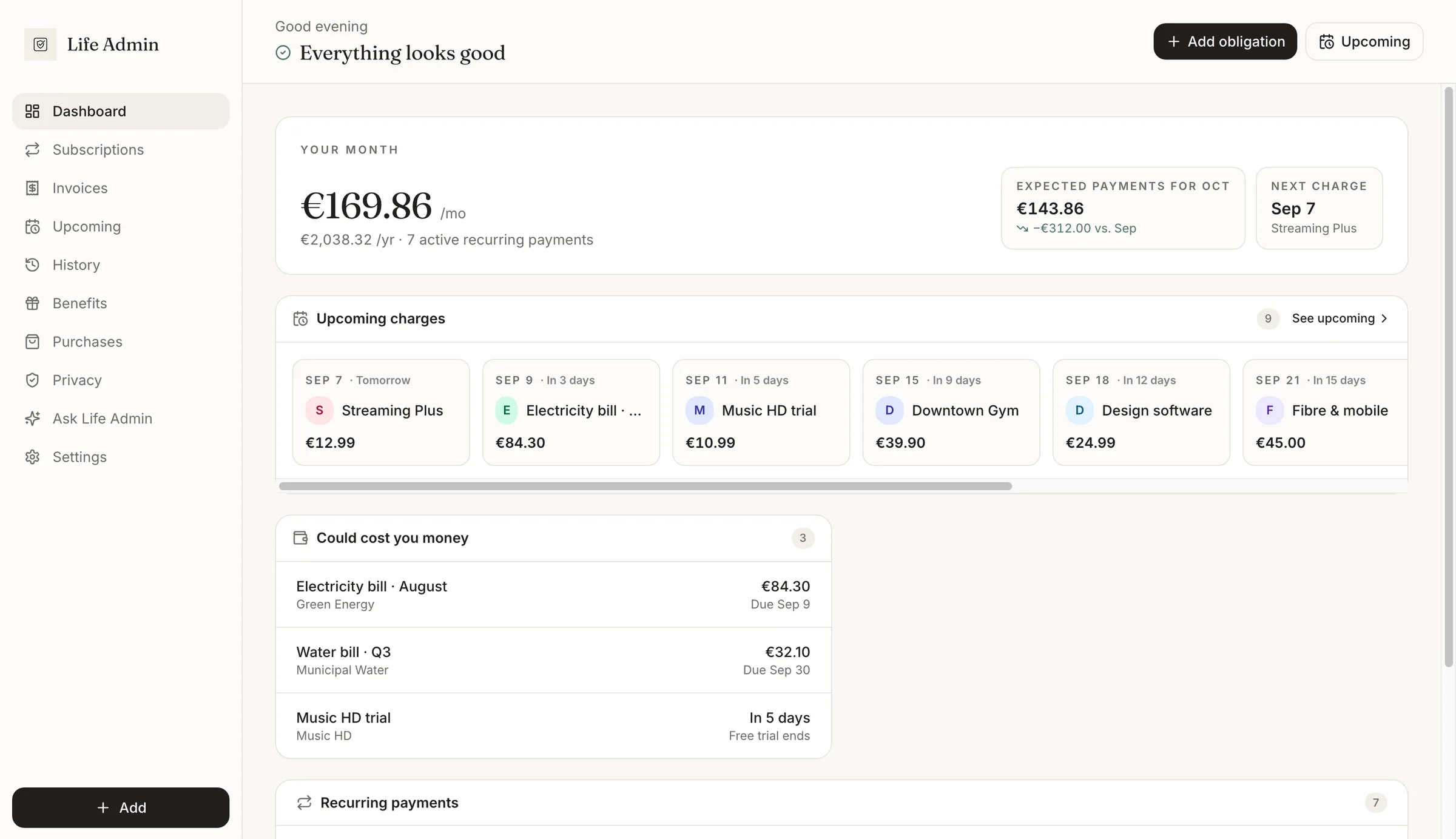
- The problem
- Invoices, subscriptions, renewals and warranties scattered across email, PDFs and notes, with nothing calculating what comes next.
- What it became
- A product that turns documents into structured obligations: frozen terms, derived cycles, evidence-based payments and AI-assisted extraction under a schema.
- The architecture that emerged
- ReactBase44DenoLLM under a closed schemaVitest
- 22entities
- 12server functions
- 939tests
03 · Payments
Fivo
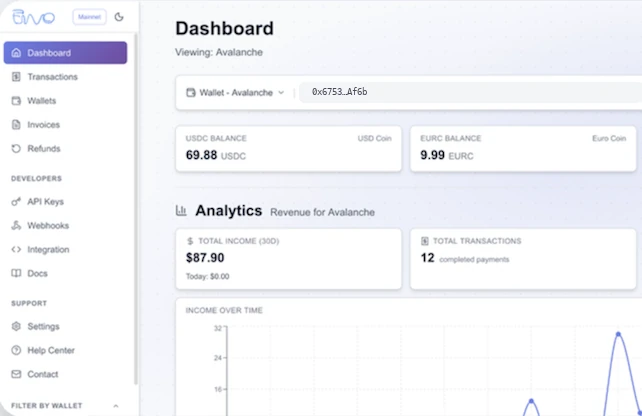
- The problem
- Accepting stablecoin payments across several networks with a single integration, with settlement, on-chain verification and cross-network movement inside the system.
- What it became
- Complete payment infrastructure: checkout, an API with keys per environment, signed webhooks, a merchant dashboard, invoices and withdrawal and refund processes.
- The architecture that emerged
- ReactNode.js + TypeScriptPostgreSQLNext.jsCCTP bridges
- 9mainnet networks
- 3integration paths
- 5webhook events
Real proofFigures verified in each system's repository. Client names and private data stay confidential; the surfaces shown are sanitised.
The three architectures differ because the problems did. That's what “custom” means.
Request versus system
We don't take the requested screen literally. We uncover the system behind it.
A request usually arrives in the shape of a screen: “we need a dashboard”, “we need a portal”. Underneath there's almost always a system. Select a request.
The request
What's usually needed
- 01Data sources
- 02Permissions
- 03Calculations
- 04Business rules
- 05API
- 06History
- 07Alerts
- 08Interface
- 09Deployment
Taking the request seriously means asking what has to happen for that screen to work.
Discovery
You don't need to come with a technical document.
You can come with a problem, a process, an idea or a tool that no longer works the way you need. Our work starts by turning that need into a clear definition of the system. These are the questions that build it.
- Goal
- Review and approve requests without email threads or parallel spreadsheets
- Users
- Operations team, management and external requesters
- Data
- —
- Rules
- —
- Automation
- —
- Integrations
- —
- Controls
- —
- Permissions
- —
- Indicators
- —
With these answers, the system already has a shape before a single line of code is written.
What we take responsibility for
From the problem to software in production, with one responsible party.
You don't need to assemble five suppliers. The project can cover the whole path:
01
Understand
- Discovery
- Product and functional definition
02
Design
- Experience and interaction
- Architecture
- Data model
03
Build
- Interface
- Server and API
- Business logic
- Automation
- AI where it helps
04
Connect
- Integrations
- Testing
- Data migration
05
Operate
- Deployment
- Documentation
- Maintenance and evolution
The scope adjusts to each project. The responsibility doesn't.
How we work
A custom software project, step by step.
01
Understand
Problem, users and expected result.
02
Define
Requirements, flows and system boundaries.
03
Architect
Data, logic, integrations and technical foundation.
04
Build
Working software, in iterations.
05
Validate
Real scenarios, tests and feedback.
06
Deploy
Production, and migration when required.
07
Evolve
The software changes as the business changes.
Who it's for
Custom software makes sense when the problem is genuinely specific.
It fits when
- Existing tools don't solve the core problem
- The workflow itself creates business value
- Proprietary logic matters
- Several systems must act as one
- The application becomes part of daily operations
- Users need a purpose-built experience
- The software is part of the product or service delivered
It isn't the best option when
- A standard tool already solves the problem well
- Only cosmetic customisation is needed
- There's no clear operational or product problem
If it fits, let's talk. If it doesn't, we'll tell you that too.
Your software
Tell us what needs to exist.
You don't need to know how to build it or which technology to use. Explain the problem, who lives with it and what should happen. We take care of turning it into a system.